What Are Agents?
There are already tons of definitions out there, but let me explain it my way 🙂
Agents are systems built to make language models more capable — not just answering in plain text, but interacting with the outside world. That means being able to call APIs, query databases, generate files, or interact with third-party services.
To put it simply:
It’s all just a for loop.
When a user says “show me the sales for the last 3 months,” the model should understand that, call the right API, process the response, and present it in a readable format.
This whole process is made possible by a core mechanism called function calling.
Quick Look at Function Calling
Function calling allows the model to trigger external functions instead of just replying in text.
So the model can produce something like this:
{
  "function_call": {
    "name": "get_invoice_summary",
    "arguments": {
      "start_date": "2024-01-01",
      "end_date": "2024-03-31"
    }
  }
}
And the system executes it — just like that.
MCP (Model Context Protocol)
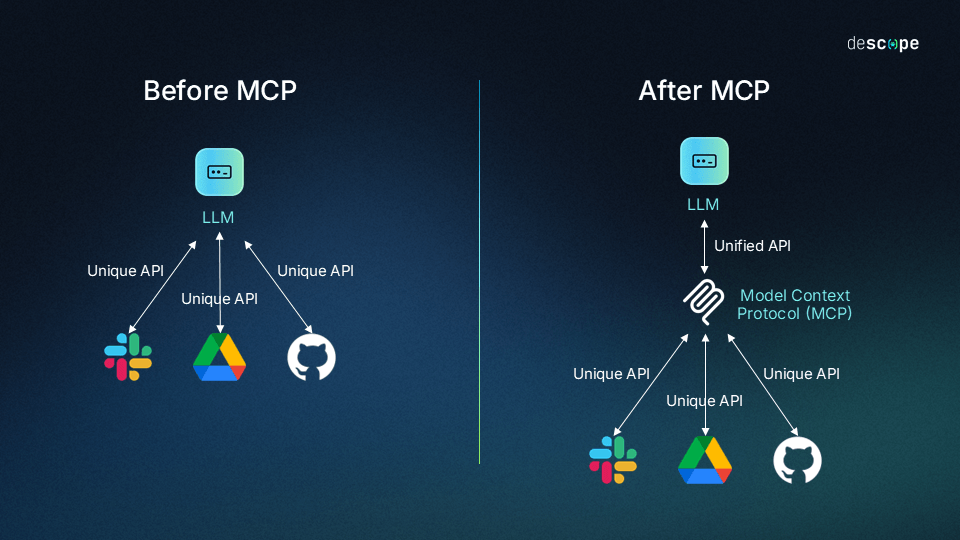
MCP — short for Model Context Protocol — was introduced by Anthropic in 2024, and quickly adopted by many developers and providers.
Its main goal:
To act as an abstraction layer between the language model and the tool layer.
Instead of asking the model to understand every single tool, its parameters and usage on the fly, MCP provides all that info in a structured way.
Why does that help?
- The system remains clean even when tool count grows.
- You can add new tools without breaking the setup.
- The model behaves more predictably and consistently.
The cool thing is, MCP is not just about “which function to call.”
It also helps define when to call it, and in what order — kind of like giving the model a mini rulebook to follow.
This becomes a life-saver in large tool-based environments — like ERP systems — where tool orchestration would otherwise be chaos.
👉 Check the official MCP docs if you want to learn more. It’s short, clear, and straight to the point.
Semantic Tool Search & Dynamic Tool Injection
Semantic Tool Search
Semantic Tool Search acts as a filtering layer between the model and a large set of tools.
Instead of forcing the model to know about every tool, we embed both the tools and the user query, and use vector similarity to find the most relevant ones.
This usually works with an embedding model like all-MiniLM-L6-v2 and a fast vector DB (like FAISS).
User prompt → vector → compare against tool descriptions → pick the closest ones.
This lets the model focus only on what matters — less noise, better results.
Dynamic Tool Injection
Once we’ve found the relevant tools, we dynamically inject only those into the model’s context.
This is called Dynamic Tool Injection.
Instead of sending all tools into the prompt (which is expensive and confusing), we only include a few — the ones that match the intent.
Benefits?
- Lower token usage
- Less decision fatigue for the model (see: Paradox of Choice)
- Cleaner, more accurate parameter handling
Combined with MCP, this pattern makes agent systems far more scalable and efficient — even with hundreds of tools in play.
Why Go With This Approach?
As MCP gained popularity, more and more SaaS platforms started integrating it.
Even Turkish Airlines published their own MCP server — feel free to check it out: THY MCP docs.
It works well for small setups. But in large-scale systems like an ERP, you might need 250+ tools. Adding all of them directly into the prompt can get messy — fast.
It causes:
- Higher token costs
- Lower model precision (too many options → confusion)
This actually mirrors a well-known psychological concept: Paradox of Choice.
The more options you give, the harder it becomes to choose — for both humans and language models.
That’s exactly why Semantic Tool Search exists.
Instead of loading everything, we ask the model to first call a special “tool search” function.
This function embeds the user request and retrieves a shortlist of tools via vector search.
The model then uses only that result set for the rest of its task.

The diagram above shows how a request from the MCP Client goes through a semantic filter before hitting the tool list. It keeps the prompt lightweight and relevant — no need to send all tools in advance.
How I Implemented It
Let me walk you through how I built this system myself — using FAISS, SentenceTransformers, and an MCP-compatible client.
1. Fetch Tools & Generate Embeddings
We first fetch the available tools from the MCP server and convert their names + descriptions into embeddings:
tools = await client.list_tools()
embeddings = model.encode([f"{tool.name} {tool.description}" for tool in tools])
vector_db.add(embeddings)
2. Embed the Query & Search
We encode the user’s request and search for the top matching tools:
query_embedding = model.encode("list available stock")
results = vector_db.search(query_embedding, k=5)
3. Run the Most Relevant Tool
With search_and_execute, the system automatically:
- Searches for the best tool,
- Suggests input parameters (like
query,k,limit, etc.), - Calls the tool via MCP:
result = await embeddings.search_and_execute_tool("list available stock")
4. Suggest Tools Instead of Running Them
If you only want suggestions (not execution), there’s also a handy method for that:
results = await search_and_suggest("show sales report", k=3)
This will give you:
- Top-k matching tools
- Their input schema
- Auto-suggested parameter values
Even if your system has hundreds of tools, this keeps things fast and scalable.
The model never has to deal with the full catalog — just what’s relevant to the task.